Cleobetra Mobile Australia: Browser Play and App Status
 Available in AU
Cleobetra’s official site currently supports browser-based mobile access. Its AU homepage tells users to open a preferred web browser and says a shortcut can be created for quicker access. Cleobetra also publishes a dedicated “Create Shortcut” page with Android and iOS home-screen instructions. That browser and shortcut route is the clearest supported mobile option.
Current official Cleobetra pages do not establish a native iOS or Android casino app. A Google Play listing titled “Cleobetra” is visible, but it is published by elite-skins / VAULT s.r.o. and links to a different support domain rather than Cleobetra.com, so it should not be treated as the official casino app.
Cleobetra Mobile Australia — More on this topic at cleobetra casino.
Table of Contents
- Mobile route: use the website in a browser
- Cleobetra’s official shortcut instructions
- Why the current Google Play listing is not treated as official
- What the mobile web interface gives access to
- Login and KYC work through the account, not through a special mobile identity
- What to check before relying on mobile access
- Australian access
- Browser shortcut versus native app: the practical difference
- Support from a mobile session
- Bottom line on Cleobetra mobile
Mobile route: use the website in a browser
The clearest current information comes from Cleobetra’s own site. The AU homepage says users can play, bet and use the site’s features by opening a preferred web browser and visiting the casino. It also directs users to create a shortcut for quicker access. The site’s games page similarly describes the service as mobile-friendly and says no app download is needed for browser play.
That means a separate native application is not required to reach the mobile website. The practical journey is the same web account environment used on desktop: open the site, use the responsive navigation, sign in through the web interface and move between the casino, live casino, sportsbook and account sections that are exposed by the current site.
Frame rates, load times, battery use and exact device compatibility can vary by handset, browser, connection and game provider. The stable point is that mobile browser access exists and Cleobetra provides a shortcut route.
Cleobetra’s official shortcut instructions
Cleobetra maintains a public “Create Shortcut” page for both Android and iOS. On Android, the page tells users to use the browser menu and select “Add to Home screen” if the site’s install link does not work. On iOS, it directs users to the browser sharing menu and then “Add to Home Screen”. The shortcut creates a convenient launcher to the website rather than proving the existence of a native casino application.
| Mobile route | Current verification | What it means |
|---|---|---|
| Mobile browser | Supported on Cleobetra’s official site | The casino site is intended to be accessed through a phone or tablet browser. |
| Home-screen shortcut | Supported on Cleobetra’s official shortcut page | A browser shortcut can be added for quicker launching. |
| Official native iOS app | No official connection established | Do not assume an App Store download is an official Cleobetra product without matching publisher details. |
| Official native Android casino app | No official connection established | A similarly named Google Play listing exists, but its publisher details do not match the casino’s official web identity. |
For an Australian reader, this distinction matters because search results and app stores can contain similarly named products. A title and icon alone are not enough to establish that an app is issued by the same operator as the casino website.
Why the current Google Play listing is not treated as official
A current Google Play page titled “Cleobetra” exists under the package name com.cleobetraapp. However, the listing names “elite-skins” as the publisher and shows VAULT s.r.o. in the developer information. Its support website is cleobetraonlinegames.com and its support email uses the elite-skins.com domain. Those identifiers do not match Cleobetra.com’s public web domain.
The listing also describes simulated gambling and a catalogue-style game experience. That may be a separate product, companion application or third-party use of the name. The publisher, support domain and developer details do not establish the corporate or technical connection needed to label it the official Cleobetra casino app.
The official Cleobetra website currently tells users how to access the service in a browser and how to add a home-screen shortcut. Until a native store listing can be tied to Cleobetra through matching official publisher details or a direct Cleobetra.com link, browser access remains the supported route.
What the mobile web interface gives access to
The current Cleobetra site navigation exposes Casino, Live Casino, Jackpots, Sports, Live Betting, Virtual Sports, Challenges, Tournaments, Shop, Collections and VIP Levels. The homepage also links to login, registration, the Help Centre, payments and responsible-gaming material. These are website features, so they can be reached through the responsive browser interface when the site itself is accessible.
The current casino navigation includes slots, bonus buys, Megaways titles, table games, live games, game shows, jackpots and other categories. The separate Cleobetra games guide covers the library and providers in more depth. This mobile page does not duplicate the game catalogue because the mobile question is primarily about access method and interface, not title count.
Likewise, funding choices should be checked in the cashier for the individual account. The Cleobetra payments page covers the current payment categories and AU-specific context without assuming that every method appears on every mobile session.
Login and KYC work through the account, not through a special mobile identity
Cleobetra’s current AU login uses the web account environment. A user signs in to the same account rather than creating a separate “mobile account”. For registration rules, login controls and account ownership requirements, see the registration guide.
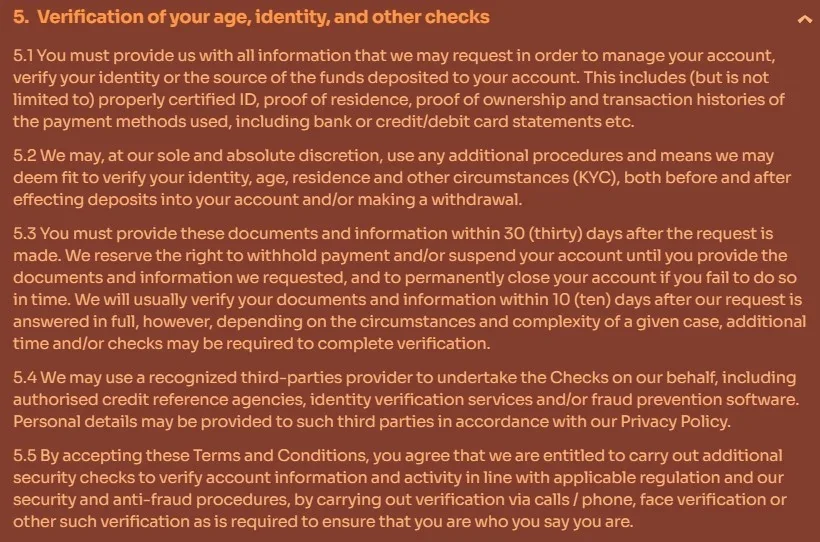
KYC is also an account-level process. Cleobetra’s terms allow identity and other checks before or after deposits and withdrawals and list examples of documents that can be requested. The verification requirements page explains those examples and timing without inventing a phone-specific KYC workflow.
This distinction is useful when a mobile interface changes. A button may move or a menu may collapse differently on a small screen, but the underlying account and verification rules remain governed by the current site and terms rather than by a separate mobile policy.
What to check before relying on mobile access
- Confirm that the page is on the expected Cleobetra.com domain before entering account credentials.
- Use the site’s own shortcut instructions if a home-screen launcher is preferred.
- Do not treat a store listing with a matching brand name as official without checking publisher and support details.
- Check the current cashier rather than assuming desktop and mobile payment menus are identical at every moment.
- Keep account verification requirements in mind before relying on a phone-only workflow for a pending withdrawal.
- Do not use a shortcut, app or alternate site as a method to bypass an ISP or regulatory block.
The last point is particularly important in Australia. A browser shortcut is a convenience feature, not a circumvention tool. If access is unavailable, use lawful support and regulatory channels rather than unverified mirror or bypass routes.
Australian access
ACMA named Cleobetra in an ISP-blocking request on 16 April 2026. Mobile browser support does not guarantee that the service will remain reachable from every Australian connection, and this page does not provide bypass instructions.
Browser shortcut versus native app: the practical difference
A home-screen shortcut can look app-like because it places an icon on the device and launches the site quickly. It still depends on web content and the browser or browser engine. A native app, by contrast, is distributed as an application package through a platform such as Apple’s App Store or Google Play and has its own identifiable developer details.
Cleobetra’s own shortcut page supports the first model. That is why an icon appearing on a home screen should not be described as proof of an official native app. The actual mobile website and official shortcut instructions are the appropriate references; a fabricated phone interface could imply functionality that is not established by the live product.
Support from a mobile session
Cleobetra states on its AU homepage that customer support is available 24/7 through live chat and email, and the site exposes Live Chat and Help Centre links in its navigation. Those channels can be useful when an account issue arises on mobile, but support availability does not guarantee a specific resolution time for payment or KYC cases.
The same support routes can be reached from a mobile browser session, so a separate native app is not required to access the published help channels.
If the issue concerns verification, follow the exact document request rather than sending unnecessary personal material through an unrelated channel. If it concerns a payment, compare the current cashier and account status with the rules explained on the dedicated payments page.
Bottom line on Cleobetra mobile
Cleobetra’s current mobile proposition is the website itself. The official AU pages promote browser access, and the brand publishes Android and iOS instructions for adding a home-screen shortcut. A current Google Play listing using the Cleobetra name exists, but its developer and support identity do not match the casino’s official web identity, so it should not be treated as the official Cleobetra casino app.
For the broader evaluation beyond mobile access, return to the Cleobetra Australia review.
Browser and shortcut access are based on Cleobetra’s current AU homepage and Create Shortcut page. The similarly named Android listing was checked on Google Play.
See also Cleobetra KYC Verification.
Created by the ”Cleobetra Casino” editorial team.